Studio Colour, our first browser extension, is now live on the Chrome Web Store. It’s a complete colour workspace that docks beside any page you’re on, so a colour decision no longer means leaving the tab you were working in.

If you design or build for the web, you know the drill. You spot a colour you like, and suddenly you’re off to a picker in one tab, a contrast checker in another, a gradient generator in a third, and a notes file to keep track of it all. By the time you’ve wrangled the value you wanted, you’ve lost ten minutes and your train of thought. Studio Colour collapses that entire scavenger hunt into a single panel that opens right on top of the page you’re looking at.
What you can do
- Pick from any pixel on the page with the built-in eyedropper: images, video frames, gradients, text, anything you can see.
- Build gradients, linear or radial, and copy the result straight out as CSS or Tailwind.
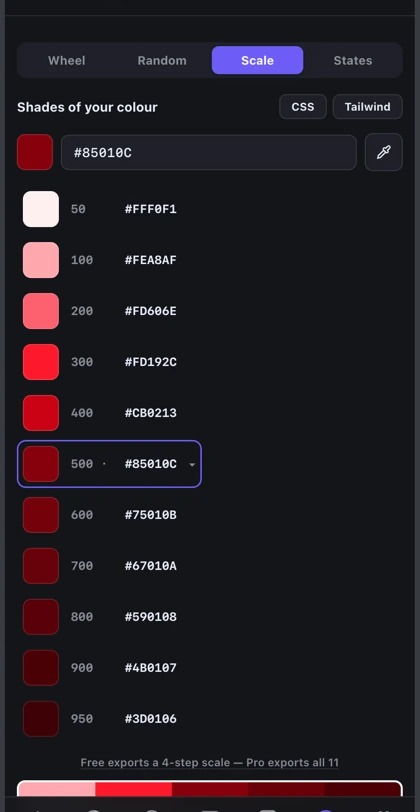
- Generate shade scales from 50 to 950 for any colour, ready to drop into a design system.
- Check contrast against WCAG AA and AAA as you go, so accessibility never becomes an afterthought.
- Extract palettes from any image, pulling an entire scheme out of a photo in one click.
- Export to CSS variables, a Tailwind config, or design tokens, the formats you actually paste into your project.
Why we built it
We built it because we were tired of the context-switching. Nailing one colour shouldn’t mean juggling four tools and a text file. We wanted a single place to pick, adjust, test, and export, something that stays beside the work while you use it. Studio Colour is the tool we kept wishing we had on every project, so we built it.
It’s designed to be fast and quiet. You open the panel, work out the colour you need, copy it and carry on with your project. You can try it without creating an account, and the basics are part of the free plan. Keeping you in the page you’re working on was the whole reason we made it.
Free to start
Picking colours, building gradients, previewing scales, and checking contrast are all free, with monthly caps on the heavier extraction tools. Studio Colour Pro lifts the caps and unlocks the on-page picker toolbar, palette exports to CSS, Tailwind and JSON, design-token export to code (Bricks, theme.json, Tailwind, SCSS, Figma and JSON), the full accessibility report, eight-stop gradients, and cloud backup of your library to your own Google Drive or Dropbox, for $29.99 a year. Most people can start on the free plan and decide about Pro once they use it every day.
Curious how it came together? We wrote about building Studio Colour, and our guide to checking colour contrast for WCAG and APCA shows the contrast tools at work.
The first of the suite
Studio Colour is the first extension in the Studio Grid suite, and it joins Studio Gauge, our free Mac menu bar app, on the shelf. Every tool in the suite is built to handle a single part of the working day properly and then stay out of the way. More are on the way, and colour felt like the right extension to start with, because everyone touches it and nobody enjoys the tool-juggling it usually takes.
Get Studio Colour
Installing it takes about ten seconds, and the free plan lets you try everything that matters before you decide anything. Add it to Chrome, pin it to your toolbar, and the next time you need a colour, it’ll be right there waiting.