Meet the GS-4. Gradient Synth is a free mesh gradient maker that works like a hardware synthesizer. Four colour voices, real knobs, a patch bank, and a drift mode that plays the gradient for you, and then it hands you the CSS. There’s nothing to sign up for or install, so just open it in a tab and start turning knobs.
Knobs, not sliders
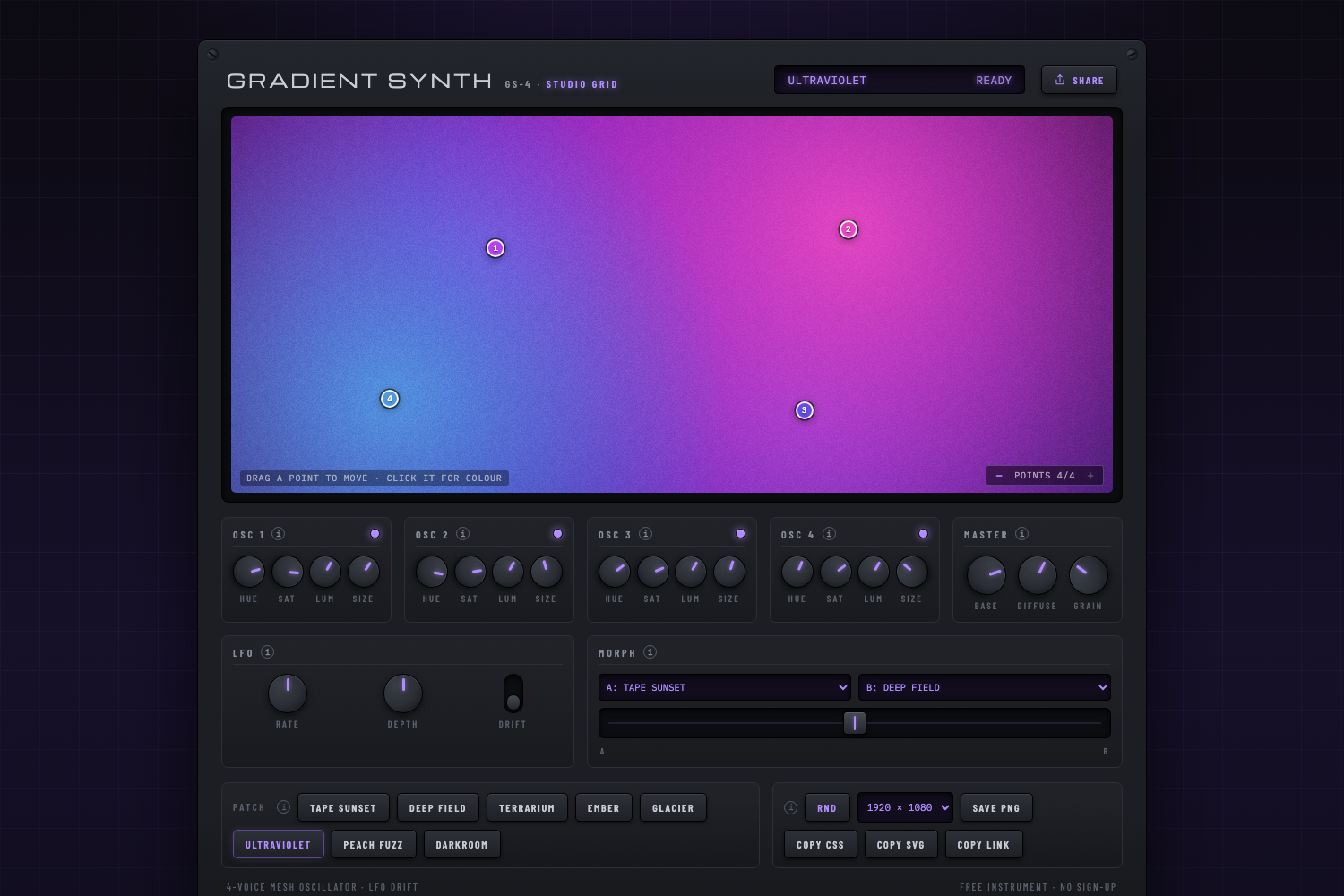
Most gradient generators feel like filling in a settings form. Gradient Synth treats a mesh gradient the way a synth treats a sound: something you patch, tweak, and perform. Each of the four oscillators is one colour point in the mesh, with HUE, SAT, LUM, and SIZE knobs (hold Shift for fine adjustment). The points themselves sit right on the screen, so you can drag one to move it or click it to open a colour picker.
A gradient needs at least two points; the +/− control on the screen adds voices up to four, and every added point arrives with a hue picked to be as far as possible from the colours already playing, so the palette expands instead of repeating itself.
Set it drifting
The LFO section is the part people leave running. Flip the DRIFT switch and the points start to wander, hues slowly crawling, with RATE and DEPTH knobs to taste. The MORPH module crossfades between any two factory patches like a DJ fader, such as Tape Sunset into Deep Field, Glacier into Ember. There are eight patches in the bank, plus an RND button when you want the machine to surprise you.
Take the gradient with you
Every patch exports as a layered CSS radial-gradient stack you can paste straight into a project, an SVG file, or wallpaper-sized PNGs (1080×1080 up to 2560×1440). Copy Link packs the entire patch into the URL, so the exact gradient on your screen, including positions, colours and grain, opens for anyone you send it to.
Why is it free?
Because it’s the kind of thing we wanted to exist, and because it’s a fair preview of how we build. Gradient Synth is part of the Studio Grid rack: Studio Colour, our colour workspace for the browser, is in review on the Chrome Web Store, and Studio Convert for Mac, where your PNG exports go next, is coming soon. If you want a short note when something new ships, there’s a mailing list at the bottom of the synth.